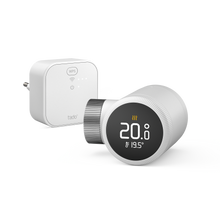
tado° Smart Thermostats, connected via Thread and Wi-Fi

tado° X devices connect to each other via Thread and connect to your Wi-Fi via the Bridge X. Control your heating in every room with our smart thermostats.

  • Smart heating control

    No complicated setup or drilling: tado° thermostats connect wirelessly to the Thread Border Router and the internet.

  • Reliable mesh network

    With Thread, the devices form a mesh network, so the signal reliably reaches every room.

  • Connect to your Wi-Fi

    Plug the Bridge X into any socket and it connects tado° to your Wi-Fi.

1 of 3

How the wireless internet connection works

Your thermostats talk to Bridge X via Thread. The Bridge X connects to your Wi-Fi router to connect your tado° devices with the internet. That way, you can control everything in the tado° app.

How it works:

  • Thermostats talk to each other via Thread
  • Bridge X connects them to your Wi-Fi router (about 1 per 100 m²)
  • Without internet your schedules keep running

Europe's #1 for smart heating

Over 1 million 

happy users

4.6 / 5 stars

 in the App Store · around 36,000 reviews

Do I need Wi-Fi for tado° X?

Yes. The Bridge X connects your tado° thermostats to your Wi-Fi router. If your internet connection fails, your devices still keep working and follow the smart schedule, stored on the device.

What is Thread?

Thread is an energy-efficient and reliable wireless network standard for smart homes. The devices form their own mesh network to communicate with each other.

Does tado° X work with my tado° V3+ Internet Bridge?

No. tado° X devices aren't compatible with the V3+ Internet Bridge. They connect via Bridge X, or via a compatible Thread border router if you already have one.

Upgrade to smart heating

Get started right away with our Starter Kits. Find the right smart thermostat for your heating today.